 CoinSpot
Reset 2FA
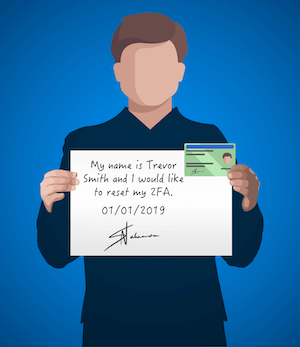
In order to have your 2FA manually reset, you will need to upload an Authorisation photo. Your Authorisation photo should look like the example below and include yourself, the photo ID used to verify your account and a handwritten authorisation statement.
Photo Requirements
- Your face and head must be clearly visible (i.e. no hats)
- Ensure you are not obstructing any part of your face
- Hold up your photo ID along with your handwritten authorisation statement ensuring your hands and arms are clearly visible
- The handwritten authorisation statement must be legible and include the below information
"My name is [Your Full Name] and I would like to reset my CoinSpot 2FA. [Your Signature] [Todays Date]"
Example Photo
Upload your Photo

Upload a file or Drag and Drop

Uploading...

File successfully uploaded
Invalid Captcha.
By clicking this button I confirm that I am authorised to provide the personal details presented and I consent to my information being checked with the document issuer or official record holder via third party systems for the purpose of confirming my identity.
Accepted file types: .JPG, .JPEG, .PNG
Your documents have been submitted.